What Apple’s 2027 Software Updates Actually Mean for You
Apple’s latest updates are here. Learn about the practical new features in iOS 27, macOS 27 Golden Gate, and watchOS 27 that will actually make your daily routine easier.

It is that time of year again. Apple’s latest round of software updates—iOS 27, macOS 27 Golden Gate, and watchOS 27—officially dropped on Monday, September 14th. If you are like most people, you probably saw the notification pop up and immediately thought, "I'll deal with that later."
While the tech world loves to obsess over the flashy, headline-grabbing features, the real story here is much simpler: these updates are designed to make the things you do every single day just a little bit faster, smoother, and less annoying.
Here is a look at the biggest features that actually matter, and why you will want to take the time to hit "Update."
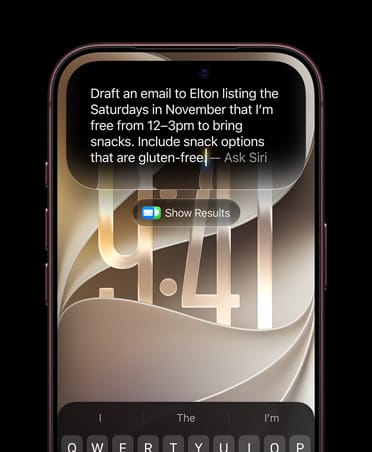
1. A Smarter, Standalone Siri AI
Siri is finally getting the upgrade we have been waiting for. In iOS 27, Siri becomes a standalone app with conversation history, allowing you to scroll back through previous chats. It also gains "onscreen awareness," meaning it can understand what you are looking at and take action on it across your apps.
2. Major Performance Boosts
This might be the most underrated feature of the update. Apple claims that apps launch up to 30% faster, new photos load 70% faster, and AirDrop transfers are up to 80% faster. If your phone has been feeling sluggish, iOS 27 might actually speed it up.

3. Liquid Glass Design Controls
Apple introduced the "Liquid Glass" design language last year, but iOS 27 gives you control over it. A new slider lets you adjust the transparency of the interface, from ultra-clear to fully tinted, which is a huge win for readability.

4. AI Photo Editing Tools
The Photos app gets "Spatial Reframing" to intelligently adjust your composition, and an "Extend" tool that uses generative AI to fill in the edges of a photo when you straighten it or change the aspect ratio.
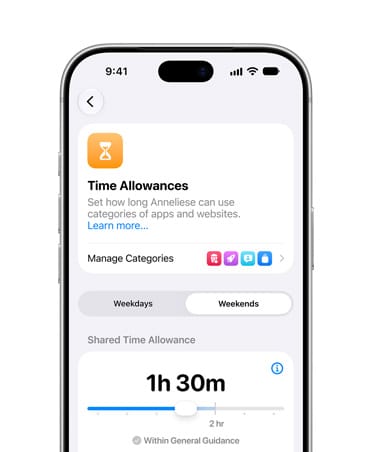
5. Smarter Parental Controls
A new "Ask to Browse" feature in Safari lets kids request access to specific websites directly from their parents, and "Time Allowances" make it easier to manage how long kids spend in specific app categories.

Final Thoughts
iOS 27 feels like a mature, thoughtful update. While it might not have the flashy visual changes of past years, the deep integration of Apple Intelligence into apps we use every day is going to make a huge difference in how we use our phones. Stay tuned for our full review once the software officially launches.
This is just the beginning of our iOS 27 coverage. Throughout the fall, we will be taking a much deeper dive into the new standalone Siri AI app, exploring advanced workflows, and breaking down how Apple Intelligence is changing the way we use our devices. Stay tuned for dedicated deep-dives on these features and more!